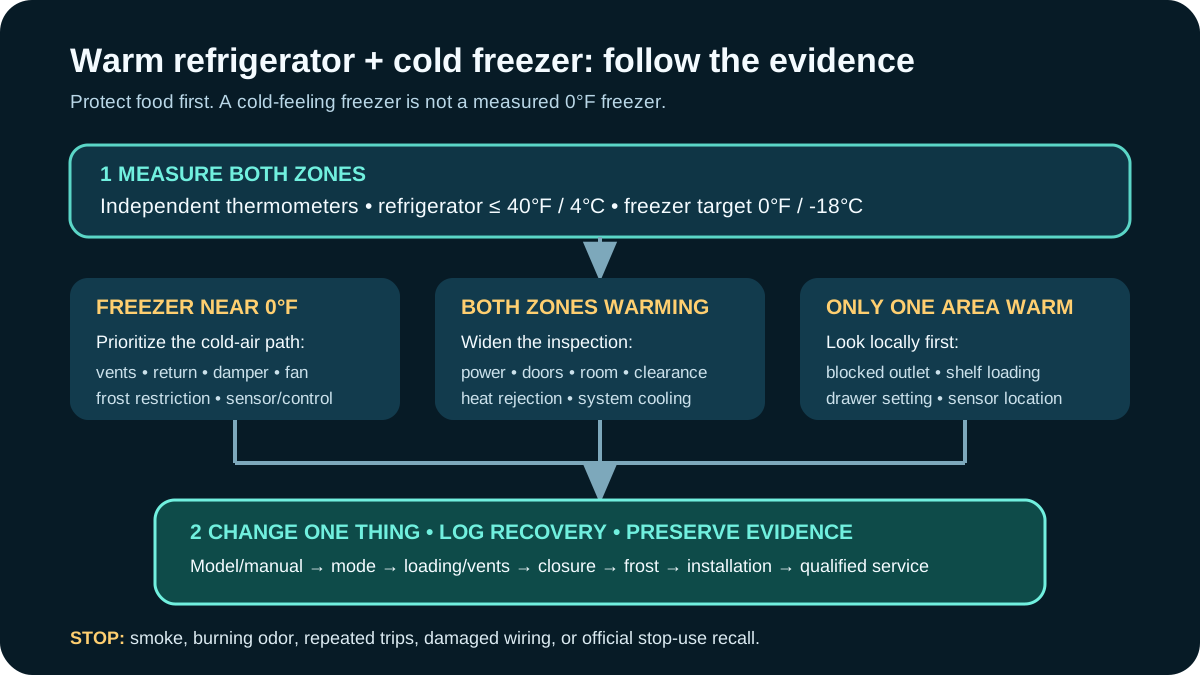
Refrigerator Warm but Freezer Cold? A FoodSafe
A thermometerled guide to a warm refrigerator and cold freezer that protects food first, then separates setting, loading, airflow, doorseal, frost, fan, damper, and sealedsystem evidence.
The Short Answer
Short Answer: Put independent appliance thermometers in both compartments, protect perishable food, and record temperatures before changing controls. A freezer near 0°F (-18°C) beside a refrigerator above 40°F (4°C) often points toward the path that moves cold air into the fresh-food section: blocked vents, a stuck damper, frost-restricted airflow, or a fan problem. Door leakage, loading, settings, installation conditions, and controls can create similar symptoms, so the temperature pattern - not a guessed part - should guide the next step.
Move perishable food to a verified refrigerator or ice-filled cooler if it cannot remain at 40°F or below. Do not taste food to judge safety. Smoke, burning odor, repeated electrical trips, damaged wiring, an active refrigerant warning, or a model under a stop-use recall requires immediate stop-use action and the official remedy.
Why “Freezer Cold” Is Not a Complete Diagnosis
Many refrigerator-freezers make cold at one evaporator and distribute it between compartments. Others use two evaporators, multiple fans, powered dampers, or convertible zones. A carton of ice cream that still feels firm does not prove the freezer is holding 0°F, and a cold display does not always show the temperature of food in the warmest shelf zone.
The symptom can mean several different things:
- the freezer is truly near 0°F while the refrigerator is too warm;
- the freezer is below 32°F but much warmer than its intended setpoint;
- both sections are warming, with frozen food merely lagging behind;
- only one refrigerator shelf or drawer is warm because air is blocked;
- the displayed value is a setpoint rather than a measured temperature;
- a recent door opening, grocery load, outage, or startup has not stabilized;
- the unit is in showroom, vacation, Sabbath, cooling-off, or convertible-zone mode.
That is why this guide begins with two thermometers and a timeline.
The Two-Zone Evidence Map
Use the map as a sequence:
- protect food and check for safety hazards;
- measure both compartments with independent thermometers;
- verify mode, setpoints, power history, and stabilization time;
- inspect owner-accessible loading, vents, doors, gaskets, and clearances;
- observe frost, sound, airflow, water, and error patterns;
- compare the pattern with the exact model manual;
- escalate internal electrical, refrigerant, fan, damper, sensor, or defrost work to qualified service.
Food Safety Comes Before Appliance Diagnosis
The FDA recommends keeping a refrigerator at 40°F (4°C) or below and a freezer at 0°F (-18°C). Because refrigerator controls often show only a setting, the FDA recommends independent appliance thermometers.
If the fresh-food compartment is warm:
- minimize door opening;
- note the first known time above 40°F, if available;
- transfer perishables to a verified cold appliance or cooler with ice/gel packs;
- keep a cooler at 40°F or below and verify it with a thermometer;
- separate raw meat or leaking packages from ready-to-eat food;
- use the official FoodSafety.gov item chart when temperature history is uncertain;
- never taste a food to decide whether it is safe.
FoodSafety.gov says an unopened refrigerator can keep food safe for up to four hours during a power outage, but an appliance fault is not automatically equivalent to a known four-hour outage. The compartment may have warmed gradually, the door may have opened, and the start time may be unknown. Use measured temperature and the official food-by-food guidance rather than treating “four hours” as permission to keep everything.
For people who are pregnant, older, immunocompromised, or otherwise at higher risk from foodborne illness, take a conservative approach and consult authoritative food-safety guidance.
Build a Temperature Record
Use thermometers made for refrigerator/freezer use. Do not rely on an infrared surface reading as the compartment air temperature. Place devices where the manual permits and where they will not interfere with vents, drawers, doors, or food.
Record:
| Time | Refrigerator °F/°C | Freezer °F/°C | Door openings | Compressor/fan sound | New food or event |
|---|---|---|---|---|---|
| Start | |||||
| +2 hours | |||||
| +4 hours | |||||
| Overnight |
Do not keep unsafe food in place merely to complete the test. A container of water can help buffer a refrigerator thermometer if the thermometer instructions support that method, but it does not override food-safety limits.
Interpret the pattern
| Measured pattern | More useful first branch |
|---|---|
| Freezer near 0°F; refrigerator above 40°F | Air transfer, damper, fresh-food fan/vent, frost blockage, sensor/control |
| Freezer 10–25°F; refrigerator above 40°F | Whole-system cooling, door leakage, condenser/clearance, heavy load, fan, defrost, sealed system |
| Both sections normal; one shelf warm | Local vent blockage, loading, drawer setting, thermometer placement |
| Temperature swings after door use | Seal, closure, loading, household use, humidity, recovery |
| Display normal; independent thermometer warm | Display mode/sensor/control, placement, service confirmation |
| Fresh-food section freezes while another area warms | Air outlet concentration, loading, damper/sensor, zoning |
This table prioritizes inspection; it does not identify a failed component.
Map the shelf-to-shelf temperature gradient
A single thermometer can miss a localized warm pocket. After food is protected, place the same verified thermometer at three documented positions on successive stable test periods: near the upper front, middle centre, and lower rear, without touching a wall or blocking a vent. Keep settings, loading, and door use comparable. A large repeatable gradient can reveal a blocked outlet, return path, drawer control, or air-mixing problem that a compartment average hides. Do not move thermometers repeatedly while judging food safety; this is a controlled diagnostic after alternate cold storage is available. Record exact placement with a photograph so the technician can reproduce the observation.
Verify the Model, Mode, and Setpoints
Photograph the model/serial label and the control panel. Download the exact use-and-care manual from the manufacturer, not a manual for a similar-looking model.
Check for:
- recommended initial setpoints;
- whether the display shows setpoint or measured temperature;
- cooling-off or showroom/demo mode;
- vacation, Sabbath, energy-saving, convertible, or party modes;
- a fresh-food zone that can be set independently;
- a control lock that prevented a change;
- an app schedule or remote setting;
- error codes, blinking values, or diagnostic alerts;
- the documented time before judging temperature after startup or adjustment.
Change only one setting at a time, by one documented increment. Turning both compartments to maximum cold can hide the pattern, freeze food near an outlet, increase runtime, and still fail to restore airflow.
Account for Startup, Outage, and Grocery-Load Recovery
A newly installed, recently unplugged, moved, cleaned, or power-restored refrigerator needs time to stabilize. GE and other manufacturers advise starting at the model's recommended controls and allowing the specified stabilization period. The exact time depends on model, room conditions, food load, and door use.
Record recent events:
- delivery or relocation;
- unit laid down or tilted contrary to transport instructions;
- power outage, breaker event, or plug disturbance;
- control reset or software update;
- a large load of warm groceries;
- doors held open during cleaning;
- ice maker or water system commissioning;
- room temperature outside the manual's installation range.
Do not repeatedly unplug and restart an inverter-controlled appliance. Follow its manual for power cycling; repeated resets can erase evidence without correcting the cause.
Check Loading and the Air Path
Cold must circulate around food and return through the designed path. A refrigerator packed tightly against outlets or return grilles may create a cold pocket beside the vent and a warm shelf elsewhere.
With the manual's compartment diagram in hand:
- identify supply vents, return vents, dampers, and sensor areas;
- move packages away from them by the stated clearance;
- remove tall items that prevent a door or drawer from closing;
- avoid lining shelves with foil, mats, trays, or paper unless approved;
- prevent bags from being pulled into a return grille;
- keep produce-drawer controls in their intended position;
- check that shelves and bins are installed in the correct slots;
- avoid overfilling and also avoid placing hot food directly against a sensor;
- photograph the before-and-after loading pattern.
Do not push a tool into a vent or force a powered damper. A vent can look open while frost, a failed fan, or a closed damper blocks flow behind it.
A simple controlled redistribution test
After securing food safety, create a modest, evenly distributed test load with open air paths. Keep settings unchanged. Record compartment temperatures over the model's stated recovery period. Improvement after redistribution supports a loading/air-path cause; no improvement keeps the fan, damper, frost, sensor, and whole-system branches open.
Inspect Doors, Drawers, and Gaskets
Warm humid room air entering through a gap adds both heat and moisture. Inspect every door, drawer, mullion flap, and ice-dispenser chute.
Look for:
- a package, shelf, bin, cable, or water line interfering with closure;
- a French-door mullion that does not fold into position;
- a freezer drawer basket installed incorrectly;
- a gasket twisted, torn, hardened, dirty, loose, or pulled from its channel;
- cabinet mislevel that lets a door drift open;
- hinges or closers that no longer align;
- a dispenser flap held open by ice or debris;
- condensation or frost concentrated beside one edge;
- door-open alarms that fail or activate unexpectedly.
Clean only as the manual directs. The popular paper-resistance test can be a rough comparison around the perimeter, but it is not a calibrated seal test and can mislead on magnetic gaskets or differently designed edges. A repeated weak spot plus visible moisture/frost is more useful evidence.
Never adjust hinges, anti-tip hardware, built-in panels, or a heavy refrigerator without the required support and instructions. Tip-over, pinch, floor, water-line, and electrical hazards are real.
Look at the Frost Pattern Without Dismantling the Appliance
Visible frost can narrow the problem:
| Observation | Possible branch to investigate |
|---|---|
| Frost beside one door edge | Door/drawer closure or gasket leakage |
| Snowy frost around packages | Humid-air entry, door use, warm uncovered food |
| Ice around dispenser chute | Flap closure, debris, ice maker/dispenser issue |
| Frost covering an interior rear panel | Airflow/defrost condition; model-specific service |
| Fan noise changes when door opens | Ice near fan, fan path, door switch logic |
| Water/ice under drawers | Drain, spill, inlet/ice-maker leak, defrost water path |
Do not remove an evaporator cover, chip ice with a knife, puncture a liner, pour boiling water into the unit, or use a heat gun/hair dryer. Samsung specifically warns against using an external heat source to accelerate manual defrosting because it can damage the refrigerator. Use only the exact manufacturer's safe defrost procedure after food is protected and power/water precautions are understood.
The companion freezer frost and ice guide provides a pattern ledger and safe thaw plan.
Observe Fans, Airflow, and Damper Behaviour
Some fans stop when a door opens. Some models delay fans after startup or defrost. Some have separate evaporator and compartment fans. Therefore, “I cannot hear a fan” is not enough to condemn one.
Owner-level evidence can include:
- expected fan/compressor sounds under the manual;
- whether sound changes with door switches operating normally;
- a new scraping, ticking, knocking, buzzing, or surging sound;
- whether air is felt at an accessible supply vent without inserting anything;
- whether airflow changes after approved loading corrections;
- whether the control reports a fan or defrost error;
- whether frost returns after a documented safe thaw;
- whether one compartment responds to a setting change and the other does not.
A closed or failed damper may leave the freezer cold and refrigerator warm. A frozen air channel, failed fan, sensor error, control fault, or wiring issue can imitate it. Damper removal, live voltage tests, internal fan access, and door-switch bypassing are service work.
Check Installation Conditions and Heat Rejection
The appliance must reject heat into the room. ENERGY STAR recommends keeping the refrigerator away from heat sources, allowing the required circulation behind it, checking door seals, and cleaning accessible condenser coils on applicable older models according to the manual.
Verify:
- side, top, rear, and toe-kick clearances against the installation guide;
- built-in ventilation grilles are not blocked;
- the unit is not beside an oven, radiator, sunny window, or unapproved enclosure;
- the room/garage temperature is within the model's rated range;
- a bottom grille is correctly installed and unobstructed;
- accessible condenser surfaces are cleaned only by the approved method;
- no recent cabinetry, flooring, or wall change reduced airflow;
- dust, pet hair, or stored items are not blocking a permitted intake.
Do not pull a heavy connected refrigerator alone. Water lines, anti-tip devices, plugs, floors, and fingers can be damaged. Many modern refrigerators conceal condensers that are not owner-serviceable; do not assume every model has coils to clean.
If both compartments are warm, the compressor seems to run at high output, and heat rejection is restricted, installation/maintenance is a strong branch. If the freezer is truly at 0°F but only the fresh-food side is warm, the inter-compartment air path remains more specific.
Separate Normal Inverter Runtime From Cooling Failure
A variable-speed compressor may run quietly for long periods. Runtime alone is not the fault. The existing inverter refrigerator guide explains modulation and normal sound patterns.
Escalate based on outcomes:
- measured temperatures remain outside safe/target ranges;
- compressor or fans are unusually loud, hot-smelling, or erratic;
- a breaker or protective device trips;
- error codes recur after the prescribed check;
- frost or ice repeatedly obstructs airflow;
- only one compartment fails to respond;
- an oil-like residue, damaged tube, or suspected refrigerant leak appears;
- cooling fails after correct clearance, loading, doors, settings, and stabilization.
Refrigerant circuits can be pressurized and may use flammable refrigerants such as R-600a. Never cut, pierce, heat, braze, recharge, or open the sealed system. Use technicians qualified for the refrigerant and jurisdiction.
Use a One-Change Diagnostic Schedule
Changing five conditions at once may make the refrigerator cold again without revealing why. Use this controlled sequence, stopping whenever food safety or a hazard requires service:
| Stage | Keep fixed | Change/check | Evidence to record |
|---|---|---|---|
| 1. Baseline | Controls, load | Two thermometers | Both zone temperatures and trend |
| 2. Controls | Load, doors | Correct documented mode/setpoint | Display and response |
| 3. Air path | Controls | Clear approved vents/reposition food | Shelf-to-shelf temperatures |
| 4. Closure | Controls, load | Remove obstruction/clean approved gasket | Edge frost, condensation, closure |
| 5. Installation | Controls | Restore required clearance/approved cleaning | Runtime, heat, temperature |
| 6. Service | Preserve evidence | Qualified model-specific diagnosis | Measured failed condition |
If the problem disappears, continue logging for several normal-use days. A single cold reading after a control change does not prove a durable repair.
Service Brief: What to Bring and What to Ask
Provide the technician:
- model, serial, purchase date, installation type, and warranty;
- independent refrigerator/freezer temperature log;
- food-safety actions already taken;
- exact settings, modes, error codes, and app alerts;
- recent outage, move, grocery load, cleaning, or repair history;
- photos of loading, vents, gaskets, frost, water, and installation clearances;
- sound/video evidence and when it occurs;
- whether doors, fans, compressor, ice maker, and dispenser behave differently;
- any breaker, smoke, odor, leak, or recall concern;
- owner checks performed under the manual.
Ask for the failed-condition evidence, not merely a proposed part. Useful findings include measured compartment temperatures, sensor readings under the service procedure, airflow/door evidence, frost pattern, fan/damper operation, defrost-system result, and sealed-system pressures or temperatures when qualified and appropriate.
Before authorizing a high-cost repair, ask what parts and labour warranty applies, whether the diagnosis fee is credited, whether refrigerant recovery/recharge is included, what collateral parts are required, and how the repaired temperature will be verified.
Check Warranty and Recall Status
Search the manufacturer's official support site and the CPSC refrigerator recall page using the complete model and serial number. Similar brand names or product photos are not enough. Recall remedies can include repair, replacement, refund, new instructions, or stop-use action; follow the official notice exactly.
Do not pay for a recall remedy that the official program covers without clarifying eligibility. Preserve proof of purchase, model/serial photos, service records, and communications.
When Repair and Replacement Become the Same Decision
A warm refrigerator may be cheap to correct if the cause is a blocked vent or closure issue. It may be costly if a model-specific sealed-system, control, evaporator, or cabinet problem is confirmed. Food loss, repeated downtime, water damage, poor fit, unavailable parts, and expiring warranties matter alongside the invoice.
Use the refrigerator repair-versus-replace worksheet only after obtaining a diagnosis. It compares five-year installed cost, energy, likely follow-on work, food-risk exposure, fit, warranty, and recycling rather than applying an arbitrary age rule.
A 24-Hour Recovery Worksheet
Use only when the manual permits continued operation and food has been protected:
| Checkpoint | Refrigerator | Freezer | Setting | Door openings | Airflow/frost/sound note |
|---|---|---|---|---|---|
| After correction | |||||
| 2 hours | |||||
| 4 hours | |||||
| 8 hours | |||||
| 24 hours |
Use the manufacturer's stated stabilization interval, not a universal deadline. If the refrigerator crosses above 40°F, keep perishable food elsewhere. If the freezer warms, follow official frozen-food guidance; do not assume refreezing is safe from appearance alone.
Frequently Asked Questions
Why is my freezer cold but my refrigerator warm?
The freezer may still make cold while airflow into the fresh-food section is blocked by loading, a damper condition, frost, or a fan problem. A door, sensor, control, or installation issue can imitate the pattern. Measure both zones before naming a part.
Can I turn the freezer colder to fix the refrigerator?
Not automatically. It may increase runtime or freeze more food without restoring the air path. Use the exact model's recommended controls and change one setting at a time.
Is food safe if the refrigerator feels cool?
Touch is not a reliable thermometer. FDA guidance is 40°F (4°C) or below for the refrigerator. Use an appliance thermometer and the FDA refrigerator thermometer guide.
Should I unplug the refrigerator to reset it?
Follow the exact manual. A reset can erase a temporary error without correcting airflow, frost, door, fan, defrost, or sealed-system problems. Protect food first and record evidence before resetting.
Does frost prove the defrost heater failed?
No. Frost can result from humid-air entry, a door gap, warm food, dispenser leakage, blocked airflow, or a defrost-system condition. Pattern and recurrence matter.
Can I melt ice with a hair dryer?
No. External heat can damage liners, wiring, sensors, refrigerant tubing, and plastics and can create shock or fire risk. Use only the manufacturer's safe procedure.
Is a refrigerator that runs constantly broken?
Not necessarily. Inverter compressors can run for long periods at low output. Measured temperature, sound, heat, power, error, and recovery evidence determines whether operation is normal.
Where should I check for a recall?
Use the complete model and serial number on the manufacturer's official support site and the CPSC refrigerator recall category. Follow any stop-use or remedy instructions exactly.
What to Read Next
Map visible frost safely with the freezer frost and ice buildup guide. If service confirms a costly fault, complete the refrigerator repair-versus-replace worksheet. For outage planning, size refrigeration from measured daily energy with the critical-load battery guide.
Sources and Verification
Temperature and food-safety claims use the FDA refrigerator thermometer guide and FoodSafety.gov outage chart. Energy and general ownership guidance uses ENERGY STAR. Samsung cooling support and GE stabilization guidance are product-specific examples. The exact model manual, service data, warranty, and CPSC recall notice control a particular appliance.
Sources and Verification
- FDA: Refrigerator Thermometers Cold Facts About Food Safety
- FoodSafety.gov: Food Safety During a Power Outage
- ENERGY STAR: Refrigerator Buying Guidance and Saving Tips
- Samsung: Cooling Issues With a Refrigerator or Freezer
- GE Appliances: Refrigerator Temperature Stabilization Period
- CPSC: Refrigerator Recalls
Editorial Review
EnergyBS Editorial Team
EnergyBS publishes practical homeowner guides. Important program, product, and cost claims should be checked against the linked source and local project documents before you commit to work.
Related Guides
View All ArticlesFreezer Frost and Ice Buildup 2026 Tool (Guide & Data)
A locationbased freezer frost diagnostic that separates normal foodsurface crystals from humidair leaks, door problems, blocked vents, drain or icemaker leaks, fan icing, and defrost faults.
Refrigerator Repair vs. Replace 2026 Tool (Guide & Data)
A diagnosisfirst refrigerator repairversusreplace worksheet that compares the full installed decision, EnergyGuide operating cost, foodloss risk, warranties, fit, serviceability, and responsible disposal.
Why Your Inverter Refrigerator Rarely Turns Off
Does an inverter refrigerator automatically turn off? Why the compressor slows down instead of stopping, how that keeps cabinet temperatures steadier, what it does to energy use, and when constant running means a service call.