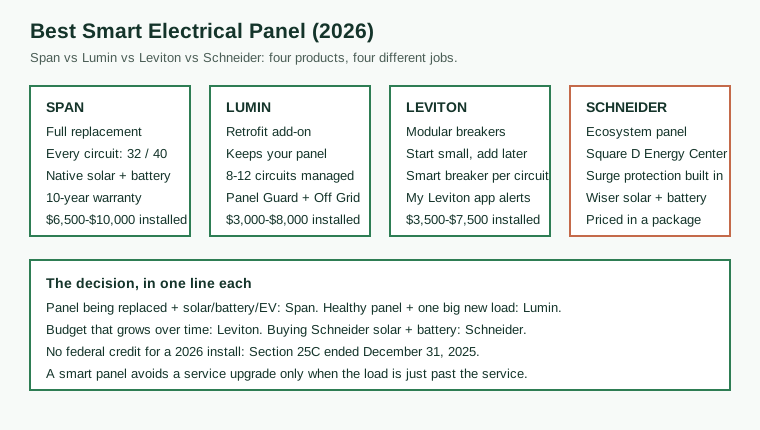
Span Smart Panel: the full replacement
Span replaces the main breaker panel outright. The MAIN 40 is a 200-amp-rated, 40-circuit panel; the MAIN 32 covers 32 circuits; the MLO 24 is the smaller main-lug-only model. Every circuit is individually metered and individually switchable from the app, which is the feature the other three products approximate in different ways. The panel uses a digital busbar instead of a mechanical breaker per circuit, so control is software switching rather than a physical click, and metering is per circuit in real time.
What you get for the premium price is depth and integration. Span coordinates with solar inverters and batteries natively, manages EV charging at circuit level, and sheds loads automatically when the house is on battery power. Installation takes 4 to 8 hours on site with 3 to 5 hours of power off, per SolarReviews, and must be done by a SPAN Authorized Installer to keep the 10-year warranty. The Denver installer guide puts a typical install at 3 to 8 hours for most homes.
Two 2026 developments changed the product. In early 2026 Eaton invested $75 million in Span, and in April 2026 Span opened a local API on the MAIN 32 (firmware r202603 and later) and announced Eaton Smart Panels running SPAN Energy Guides in MAIN 16, MLO 24, MAIN 40 and MLO 48 configurations through Eaton distribution channels. The local API matters for a specific buyer: a household that runs its own home automation hub can now read the panel locally instead of routing every reading through Span's cloud. API support for the other models was expected in the second half of 2026, per the installer write-up that reported the announcement. Both Span-branded and Eaton-branded panels still require a SPAN Authorized Installer for commissioning.
The catch to check before buying is the subscription. SolarReviews notes Span may charge $8 a month after year one for full app features. That is a small number against a $8,000 install, but it is a recurring cost on a product whose main selling point is the app, and it should be confirmed in writing at quote time rather than discovered a year later. The other catch is scope: Span is a panel replacement, so a house whose panel is healthy pays for a swap it does not need. If the panel is due for replacement anyway (old, undersized, or a known fire-risk model), the smart premium is the difference between the Span job and a plain panel job, not the full $6,500 to $10,000.
Buy Span when: the panel is being replaced anyway; the house has or will have solar plus a battery; there are two EVs or a heat pump plus an EV; per-circuit control of everything matters more than the lowest installed price.
Skip Span when: the existing panel is healthy and has spare capacity; the budget is under $5,000; the only goal is monitoring, not control (a whole-home monitor plus a few monitored circuits costs far less).
Lumin Smart Panel: the retrofit
Lumin takes the opposite approach: it does not replace anything. It is a retrofit controller, a small subpanel that installs alongside the existing breaker panel and takes over a set of circuits for monitoring and switching. That single design choice drives everything else about it. The install is the fastest of the four, the installed price is the lowest, and the house keeps a panel that is already doing its job.
Lumin's own site describes two features by name. Panel Guard adds, monitors and controls electric appliances such as EV chargers, water heaters and induction cooktops, and keeps the house inside its service panel's capacity limits with built-in load management, which is how a 100-amp house adds a 40-amp EV charger without a service upgrade. Off Grid Manager extends battery backup by automatically managing energy use against battery state of charge, with integrations for Tesla, Enphase, SolarEdge, EG4 and FranklinWH batteries, and the app keeps working locally on Wi-Fi during a grid outage. The site also lists time-of-use shifting, net-metering optimisation for California's NEM 3.0 export rules, and compatibility with any breaker panel or battery.
The one number to handle with care is the circuit count. Published sources disagree: HomeEnergyGeek and SolarReviews put Lumin at up to 8 circuits; EA Electrics lists 12; Malfettone, which installs the product, writes eight to twelve. The manufacturer does not publish a single circuit number on its homepage. The disagreement is not a rounding error, it is different installers counting different configurations, and the right move is to ask the quoting installer how many circuits the quoted price covers and what each additional circuit costs. Eight circuits is enough for the five loads that dominate most bills (heat pump, EV charger, water heater, oven, dryer). Twelve covers those plus the pool pump, the hot tub and the second EV charger. Count your loads before you count circuits.
Buy Lumin when: the existing panel is healthy; the goal is to add one or two big loads (EV charger, heat pump, induction range) without a service upgrade; the house has a battery and the owner wants longer backup from the battery it already has; the budget tops out around $5,000 to $8,000.
Skip Lumin when: the panel itself needs replacing; the owner wants every circuit metered and switchable; the house has more than twelve circuits that need individual control.
Leviton Smart Load Center: the modular route
Leviton is the conventional choice with a smart option bolted on. The Smart Load Center is a standard 200-amp Leviton panel that accepts standard plug-on neutral breakers today and Leviton's second-generation smart breakers whenever the owner wants them. Monitoring and control arrive one breaker at a time, which makes it the only one of the four that can start cheap and grow.
The app side is the My Leviton app, and Leviton's own support documentation lists what it does: customise the dashboard, view whole-home consumption and production, monitor usage per branch circuit breaker, compare cost and energy graphs per circuit, schedule second-generation breakers on and off, and receive alerts when a critical circuit trips, when an appliance has been left on, or when one stops drawing power (the classic silent refrigerator failure). That alert list is the practical core of the product: the panel tells you the fridge stopped, not just that the house used fewer watts.
Pricing follows the breaker count, which is both the strength and the risk. Malfettone puts a Leviton job at $3,500 to $6,500 installed, and at $4,000 to $7,500 with a handful of smart breakers. A quote with two smart breakers looks cheap against Span and then stops being cheap at twelve. Price the job by naming the circuits in the quote: the heat pump, the EV charger, the water heater, the oven and the dryer, five smart breakers, not "a smart panel". The deep-dive on this site lists the Leviton gateway at $900 plus smart breakers with $1,500 to $2,500 of install cost, which is the same shape: hardware that scales with ambition.
Buy Leviton when: the panel needs replacing but the budget cannot stretch to Span; the owner wants to start with two or three monitored circuits and add more later; the house already uses Leviton lighting and the owner wants one app.
Skip Leviton when: the owner wants every circuit controlled from day one; the house needs automatic battery load shedding in an outage without extra hardware (Leviton says its LWHEM-2 hub can shed nonessential smart breakers when paired with a transfer switch, but that is a separate integration rather than the built-in battery control Span or Schneider sell); the quote prices twelve smart breakers, at which point the total is close to Span money for less control.
Schneider Home: Square D Energy Center and Pulse
Schneider is the hardest of the four to price on its own, because it is usually sold as part of a system. The Square D Energy Center is Schneider Electric's whole-home energy platform: a backup interface and energy hub designed to pair with Schneider's own inverter, battery and EV charger, run through the Wiser app. Schneider Pulse is the smart panel within that setup. HomeEnergyGeek lists the Pulse panel at $3,000 to about $4,850 to $5,150 plus install, and notes tight integration with Schneider solar and battery equipment.
Two features set Schneider apart from the other three. First, whole-home surge protection is built into the Energy Center, per the Seattle installer guide that compares the three brands, which removes a separate $300 to $700 whole-house surge protector job from the list (the site's surge protector guide prices that job separately). Second, the setup is the product: the panel, the inverter, the battery and the charger share one app and one support line, and the panel's value is best judged as a whole-home energy app rather than a panel app. That is also the limitation. A house with a Tesla Powerwall or an Enphase battery gets less from Schneider's native integration than a house buying Schneider's battery, and a panel bought outside the setup is a premium panel without its main advantage.
Buy Schneider when: the house already runs Schneider or Square D equipment; the owner is buying solar plus battery plus EV charging as one package and wants a single vendor; built-in surge protection and one app for the whole system matter.
Skip Schneider when: the house already has a battery from another brand; the owner wants a standalone panel price rather than a package quote; per-circuit control of every circuit is the priority (Span meters more, for similar money).
Blackouts: which panels keep the essentials running
"Smart panels that prioritize essential appliances during a blackout" is one of the queries bringing readers to this site, and it deserves a direct answer, because the four panels behave differently when the grid goes down. A panel does not create backup power. The battery (or generator) creates it. The panel decides which circuits get it, and for how long.
Span sheds loads automatically. With a battery in the system, the panel ranks circuits and drops the non-essentials (the dryer, the second EV charger, the pool pump) so the fridge, the furnace fan, the lights and the medical equipment keep running on the battery's remaining charge. The value is in the ranking: a battery that runs everything for two hours and then dies is worse than a battery that runs the essentials for eight. The ranking is set in the app, and it should be set before the first outage, not during it.
Lumin's Off Grid Manager does the same job from the retrofit side. It manages energy use against battery state of charge automatically, and because the app works locally on Wi-Fi during a grid outage, the owner can change priorities from the phone while the internet is down. The battery integrations (Tesla, Enphase, SolarEdge, EG4, FranklinWH) are what make the state-of-charge readings reliable enough to automate against. A Lumin house without a battery still benefits in an outage only in the limited sense that the app keeps working locally; there is no power to manage.
Schneider's Energy Center is a backup interface by design: it sits between the grid, the battery and the house, and the essential-loads subpanel is part of the package. In a Schneider system the blackout behaviour is configured at install time as a protected-loads list, which is the most deterministic of the four and the least flexible after the fact.
Leviton depends most on other equipment here. A smart breaker can be switched off remotely, so the owner can kill the water heater from the phone, and Leviton's LWHEM-2 product page says the hub can shed nonessential breakers on backup power when it is paired with a transfer switch. The battery or generator and its transfer equipment remain a separate purchase, so confirm with the installer exactly which signal triggers the shedding before counting on it.
The practical test, whichever panel is on the wall: write down the five circuits that must stay on in a winter outage (fridge, furnace or heat pump air handler, a few lights, the sump pump, the medical device) and ask the installer to show you, in the app, that those five are protected and everything else sheds first. If the installer cannot show it, the blackout feature is marketing, not a configuration.